TV & Electronics Packing in Richmond, CA
JH Moving provides TV and electronics packing in Richmond and across the Bay Area. We use specialty TV boxes with foam corner protectors to protect flat screens from 32 to 80+ inches, not just blankets. Every booked move includes up to 2 TV boxes for use during the move. Additional TV boxes, specialty electronics boxes, and full electronics packing are available as part of our paid packing service and quoted upfront. We also pack monitors, gaming consoles, sound systems, and AV equipment. Call (510) 495-1884 for a free estimate.
Licensed & Insured
Cal-T201700
Why TV Boxes Beat Moving Blankets
A moving blanket is soft padding. It stops surface scratches. It does not stop impact, pressure, or flex.
When a blanket-wrapped TV sits between a dresser and a stack of boxes in a moving truck, one hard brake on I-880 pushes everything forward. The blanket compresses to almost nothing. A dresser corner or a box edge hits the screen directly. A 65-inch OLED costs $1,500 to $3,000 to replace, and screen damage is never repairable. You replace the TV.
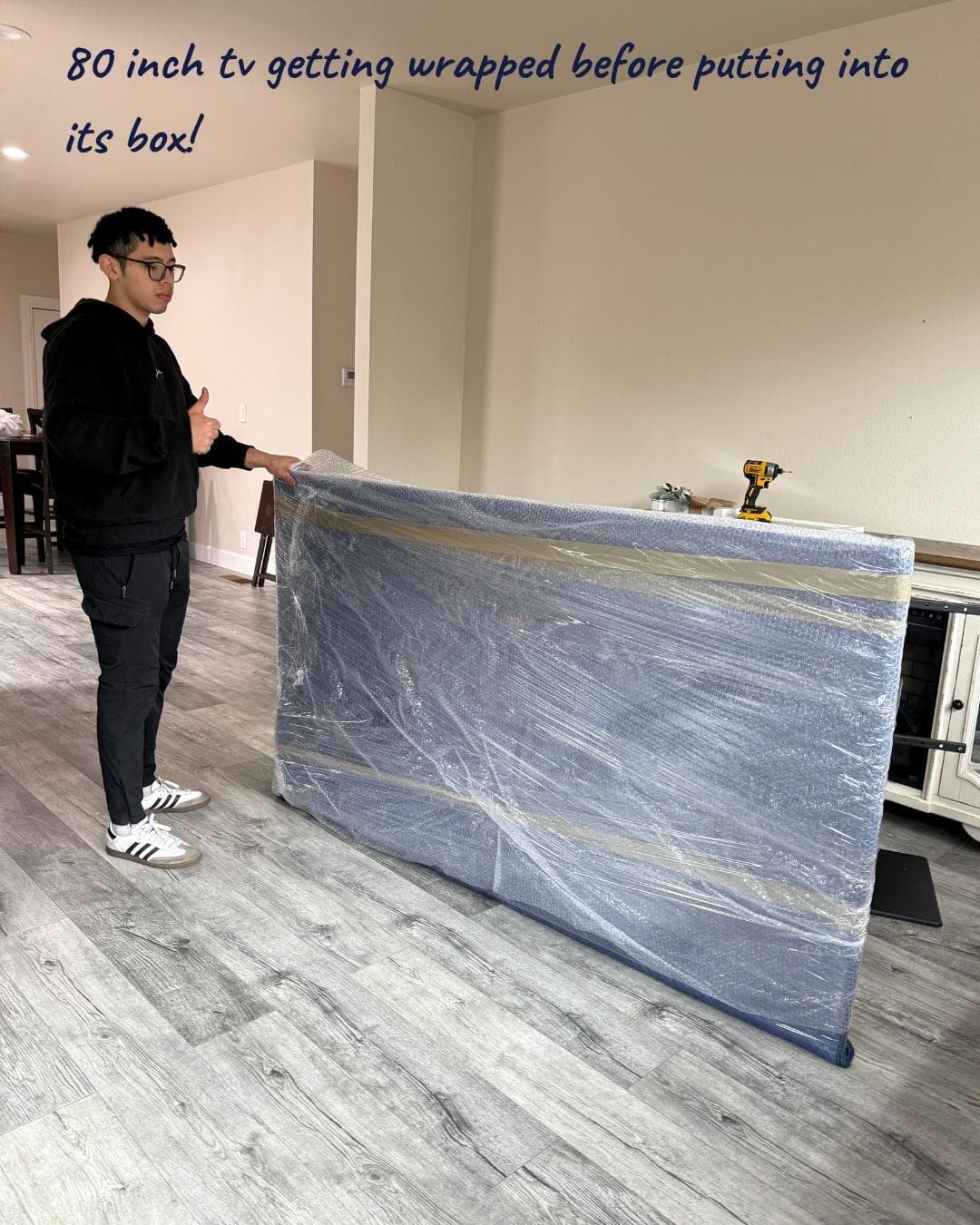
A proper TV box is structural protection, not just padding. Ours are double-walled corrugated cardboard with a telescoping design that adjusts to fit screens from 32 to 80+ inches diagonally. The two halves slide together for a snug fit with no air gap, which prevents the TV from shifting or flexing inside the box. Foam corner protectors lock onto all four corners of the TV and distribute impact across the frame rather than the screen. Anti-static wrap (not regular bubble wrap, which can generate static that damages sensitive panels) goes against the screen surface first.
Every booked move with JH Moving includes up to 2 TV boxes with foam corners at no extra charge for use during the move. Most households have 1 to 2 TVs, so this covers the majority of moves. If you need additional TV boxes, specialty electronics boxes for monitors, consoles, audio equipment, or peripherals, those are part of our packing kit and quoted upfront as part of your estimate.
Why Flat Screens Actually Fail
Understanding why screens break is what changes behavior. "Be careful with the TV" is vague. Here's what's actually happening inside a flat-screen panel during a move.
LCD and OLED panels are rigid glass sandwiches. An LCD screen is liquid crystal material sealed between two sheets of glass with polarizing filters, backlight, and a color filter layer. An OLED screen uses organic light-emitting compounds layered on a glass substrate. Both technologies depend on the precise alignment of microscopic layers. Any flex, pressure, or impact that disturbs those layers produces visible damage: dead pixels, color bands, dark patches, or complete panel failure.
The screen itself is structurally weak. Modern TVs are designed to be thin, and the panel is essentially the entire front face of the TV. The frame around it provides some rigidity, but the glass surface doesn't have a protective structure behind it the way, say, a car windshield does. Press on the center of a TV screen and you can see the display pattern distort under your finger. Now imagine that same pressure from a dresser corner during a hard brake.
Three failure modes in moves.
Direct impact. A point load (corner of furniture, edge of a box, dropped remote) hits the screen surface and cracks the glass or damages the panel layers underneath. The glass may look intact while the display is ruined, or the glass cracks and the failure is obvious.
Flex. The screen panel flexes beyond its tolerance when pressure is applied to one part of the TV and the opposite side isn't supported. This happens when a TV is wedged between two objects that push inward, or when the TV is lifted incorrectly by the edges. Flex damage often shows up as dark lines or color bands across the display.
Panel pressure from being laid flat. A TV laid on its back has the weight of the TV itself pressing down on the center of the panel. During transport, road vibration amplifies that pressure with every bump. LCD and OLED panels can develop dead zones or cracks from the inside even when nothing ever hit them externally. This is why "it was laying on the bed, nothing touched it" is still how TVs get damaged.
What prevents all three. A rigid box that isolates the TV from other items (prevents direct impact), a snug fit with foam corners that supports the frame without stressing the center (prevents flex), and upright loading in the truck with the TV secured against tipping (prevents panel pressure). This is what a proper TV pack delivers. Blankets don't do any of the three.
Wall-Mounted TVs: The Removal Stage That Damages More TVs Than the Move Itself
A surprising share of TV damage happens before the TV ever gets into a box, and the reason is the wall mount.
TV wall mounts have two parts: the bracket on the back of the TV (attached with four screws, usually M6 or M8) and the arm mounted to the wall. The TV lifts off the wall arm by sliding or tilting depending on the mount design. Three things go wrong during DIY removal.
The TV is heavier than people expect. A 65-inch TV weighs 50 to 70 pounds. A 75-inch weighs 65 to 90. One person trying to lift a TV off a wall mount one-handed while the other hand is still disconnecting cables is the classic way TVs end up on the floor.
The mount is stiffer than people expect. Wall mounts often haven't moved in years. Dust, paint, and corrosion can freeze the locking mechanism. Pulling hard to unstick a frozen mount while the TV is still attached is how screens crack, because the panel flexes when the frame is being yanked.
Cables are still connected. Power cord, HDMI, optical audio, ethernet, sometimes USB. Disconnecting after the TV is off the mount (one-handed, with the TV propped up somehow) is awkward and rushed. Tugging a cable with the TV unstable is how ports break inside the TV.
How we handle it. The crew disconnects all cables first, with the TV still securely mounted to the wall. Cables get labeled and bagged immediately so nothing goes missing. Two crew members support the TV during removal, not one. The mount gets released carefully, with a test pull first to see how stiff it is before committing to pulling the TV free. The TV comes off the wall, goes directly into the foam corners and TV box, and gets loaded upright in the truck.
The wall mount itself. If you're leaving the mount at the old home, we unscrew the bracket from the back of the TV and leave the wall arm in place. If you're taking the mount with you, we remove it from the wall (studs get noted so you can patch the holes), label the hardware, and pack the arm and bracket for reinstallation at the new home.
Reinstallation at the new home. We can reinstall a mount at the new home if the studs are already marked or the previous mount location is clear. We don't do the stud-finding, wall-drilling, and structural mount installation on a new wall, which is specialty work requiring a TV mount installer. That's an electrician or a dedicated TV installation service. We'll flag this on the walkthrough if it applies to your move.
Electronics Beyond TVs
TVs are the highest-risk single item, but electronics packing covers a wider category where the failure modes are different.
Computer monitors. Same basic approach as small TVs. Foam corners on all four corners of the monitor, anti-static wrap against the screen, appropriately sized box, upright loading. Dual-monitor setups are common in Bay Area home offices, especially in Oakland, Berkeley, and the East Bay tech corridor. Each monitor gets its own box rather than pairing two in one, because paired monitors can knock into each other during transit.
Desktop computers and towers. Internal components (hard drives, graphics cards, RAM modules) are sensitive to vibration and static electricity. Desktops get anti-static wrap, double-walled boxes, foam or paper cushioning on all sides, and ride upright whenever possible. Hard drives should ideally be backed up before the move in case of vibration damage, though this is increasingly less critical as SSDs replace spinning drives. If you have a gaming PC or workstation with high-value internal components, mention it at the walkthrough so we can plan accordingly.
Gaming consoles (PS5, Xbox, Nintendo Switch, etc.). Padded boxes with the console wrapped in anti-static material. Cables bagged and labeled. Controllers packed separately. Games, discs, and accessories boxed together.
Audio equipment. Receivers, soundbars, subwoofers, turntables, and specialty audio gear each get individual wrapping and cushioning. Turntables specifically need the counterweight removed (or secured), the tone arm locked, and the platter either removed or cushioned. Speakers with exposed cones get extra protection because dropped or impacted cones are often unrepairable.
Printers. Scanner beds get taped shut so they don't shift during transport, and ink or toner cartridges get removed to prevent leaks. Laser printers in particular can have toner spill inside if not handled upright.
Peripherals and accessories. Keyboards, mice, webcams, external hard drives, docks, and the general mess of cables that accumulates around a workstation all get boxed together or with their parent device. Labeled cable bags are the single most useful technique here, because tracing cables at the new home is tedious and error-prone.
Cables, in general. Every cord gets labeled at the source (the device it belongs to) with a piece of tape and a marker note. Then it goes into a labeled bag tied to or packed with that device. Generic "miscellaneous cables" bags are the enemy of a fast setup at the new home.
All of this is part of the packing kit, sized to what you have. The 2 TV boxes included free with a booked move cover TVs only. Additional electronics packing is part of the paid kit.
When to Pack Your Own, When to Let Us Do It
The honest decision framework, because full-service packing isn't always the right call.
Hand it off to us when:
- You have TVs you'd be upset to replace, and you don't have the original boxes
- You have wall-mounted TVs and aren't comfortable doing the removal yourself
- You have a desktop or gaming PC with components you don't want to unplug and re-cable
- You have audio equipment that needs specialty handling (turntables, speakers, high-end components)
- You're short on time and don't want to research packing technique for each device
- You want the liability to be on the mover if something goes wrong
Pack it yourself when:
- You have the original boxes for your devices (this is the best packing regardless of who does it)
- You have inexpensive or easily replaceable devices and the cost math doesn't justify the packing service
- You have a single small TV and feel comfortable wrapping it in anti-static material, foam corners, and a TV box
- You want to save on the packing kit cost and you're okay with PBO liability
The PBO (packed by owner) trade-off. Under California regulations, movers can only accept liability for items they personally packed. Anything you pack yourself is marked PBO on the inventory and excluded from damage claims. This is standard industry practice and legally required, not a JH-specific limitation. If you pack your TV yourself and it arrives damaged, the claim isn't covered even if the truck drove perfectly. If we pack it and it arrives damaged, we cover it subject to California's standard liability ($0.60 per pound per item, or roughly $36 for a 60-pound 65-inch TV). For high-value electronics, the liability gap between PBO and pro-pack is real and worth thinking about before you decide.
One middle path: original box with pro-pack labeling. If you still have the original box for your TV or monitor, the best approach is to keep the device in its original packaging (manufacturer packaging is designed for shipping and is always better than anything we bring) and have us handle loading, transport, and unloading. That way the packing is manufacturer-quality and the handling is professional, giving you the best protection and coverage.
How TV and Electronics Packing Works
-
Get your free estimate. Call (510) 495-1884 or request a quote at /free-estimate/. Tell us how many TVs, monitors, and other electronics you have, and whether any TVs are wall-mounted. We recommend a kit and give you a quote with a Not to Exceed price.
-
We pack everything on site. The crew disconnects and labels cables, removes wall-mounted TVs with two-person handling, wraps each screen in anti-static material and foam corners, and seals it in a telescoping TV box. Monitors, consoles, and audio equipment get individually boxed with appropriate materials. Every electronics box is marked FRAGILE, THIS SIDE UP, and loaded upright in the truck.
-
Your electronics ride safe. Boxed TVs and monitors travel upright and secured. On arrival, we unload each box to the correct room, unpack if the job includes unpacking, and can reinstall wall mounts where the mounting location is already prepared.
What to Do Before the Crew Arrives
- Find original boxes if you have them. Manufacturer packaging is better than anything we bring. Pull out any TV, monitor, or device boxes from the closet before move day.
- Note which TVs are wall-mounted so we bring the right tools and plan two-person handling.
- Back up important data from desktops, laptops, and external drives before the move. Vibration damage is rare but possible, and backups are cheap insurance.
- Clear a path around wall-mounted TVs so the crew has room to work. Moving furniture that's underneath a TV is harder than removing the TV first, so plan the sequence accordingly.
- Know where TVs go at the new home. If you're reinstalling on a new wall, have the mount location planned or the installer scheduled.
Before booking any mover, verify their California moving license through the BHGS license search tool. Our license number is Cal-T201700.
Need protection for other fragile items too? Our fragile item packing team handles china, artwork, mirrors, and antiques with careful wrapping and item-specific techniques. Check out our full packing services or our moving services to plan your move.
Get a Free Estimate
Call us or fill out our form for an honest quote with no hidden fees.
(510) 495-1884Or fill out our formWhy JH Moving
Professional Packing Services & Moving Supplies in Action
Everything You Get With Specialized TV & Electronics Packing
What Customers Say About Our TV and Electronics Packing
Real customers, real moves, real results.
Frequently Asked Questions
Every booked move with JH Moving includes up to 2 TV boxes for use during the move at no extra charge. These are double-walled telescoping boxes with foam corner protectors, not the flat picture boxes or single-wall cartons you find at hardware stores. If you have more than 2 TVs or need additional electronics packing (monitors, consoles, audio equipment), extra boxes and specialty materials are part of our packing kit, sized to your home and quoted upfront as part of your estimate. Call (510) 495-1884 to confirm box sizes for your screens.
You Might Also Need
Get a Free TV and Electronics Packing Estimate
Tell us how many screens you have and what sizes. We'll bring the right boxes and foam corners, with any additional TV boxes or specialty electronics packing quoted upfront as part of the kit.
Licensed Cal-T201700. 300+ five-star reviews. Family-owned and based in Richmond since 2019.
Your TV is too expensive to gamble on blankets alone.
Serving the East Bay and Bay Area